SMS gateway API: the short answer
Most SMS gateway API pages make the same promise: send an HTTP request, deliver an SMS, return JSON. That is only the first part of the job. A real operator also needs to choose the sender, collect replies, watch status events, limit device volume, and keep messaging costs from turning into a variable tax.
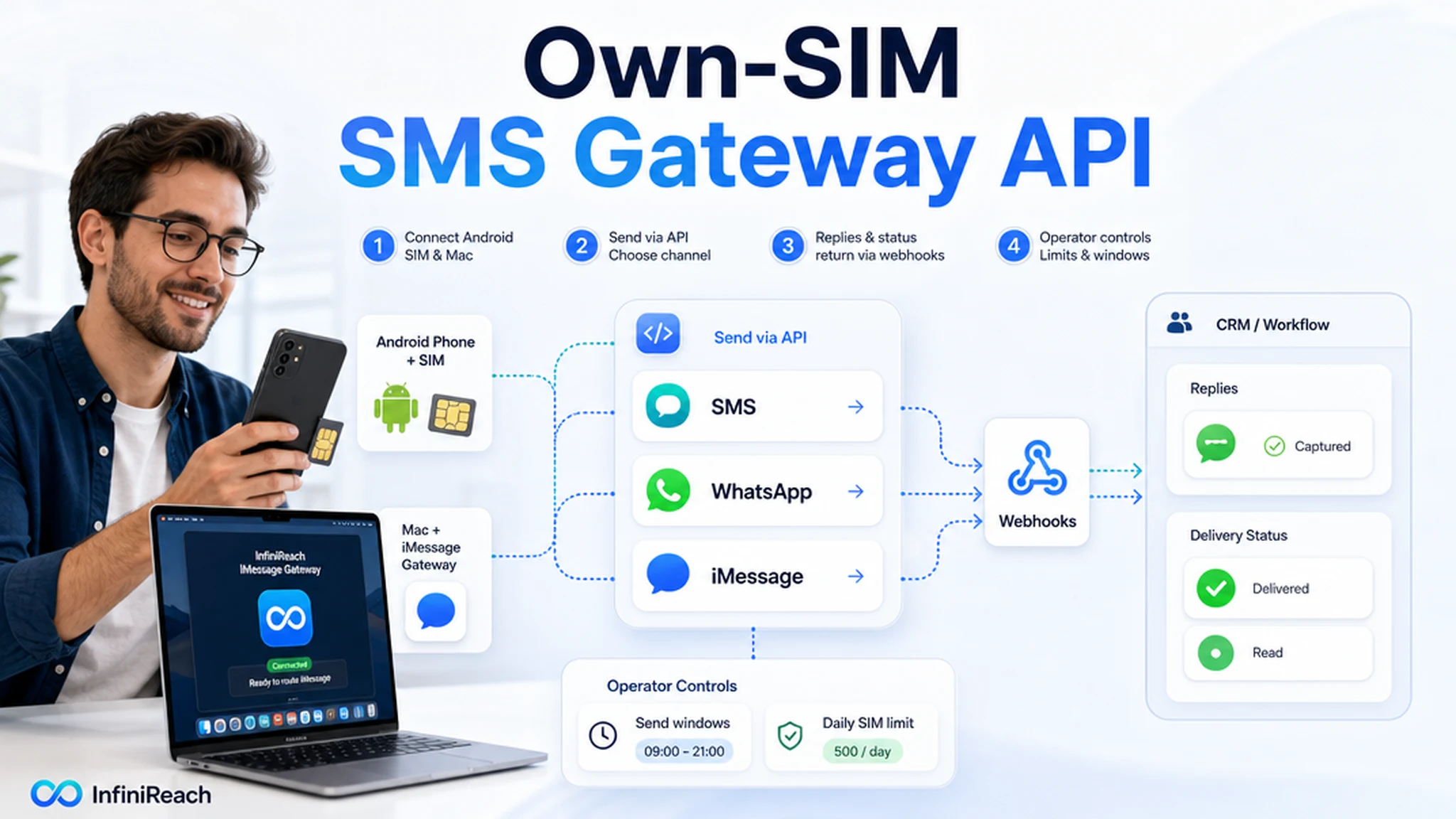
InfiniReach is built for that operating layer. Your app, CRM, n8n workflow, Zap, Make scenario, or backend service can call InfiniReach to send through a connected Android SIM and number you control. The same platform can route WhatsApp where that channel fits, route iMessage through a Mac signed into Messages with the InfiniReach iMessage Gateway app, then send replies and delivery events back through webhooks.
key takeaways
Use this page if you want an API for production messaging, not another demo that stops after one test SMS.
- Send SMS from an Android phone, own SIM, and own number instead of defaulting to rented senders.
- Use explicit API control over the sender and channel so workflows can choose the right route.
- Bring replies and delivery status back into your CRM or backend through webhooks.
- Use send windows and daily SIM limits when a workflow moves from testing into real volume.
- Keep SMS, WhatsApp, and Mac iMessage routing in one messaging stack when customer follow-up needs more than one channel.
why teams search for an SMS gateway API
The search intent is usually practical. A developer wants a simple endpoint, but the buying question is bigger than "can it send one SMS?" Teams need to know who controls the sender, where replies land, how status events return to the system of record, and what happens when automated volume grows.
Twilio and other broad CPaaS platforms set the expectation for reliable API sending, delivery events, and developer documentation. The gap many teams still feel is sender ownership and predictable economics: they want API control without moving every customer touch into rented-number, per-message infrastructure. InfiniReach focuses on that layer: own-SIM SMS, SMS plus WhatsApp, Mac iMessage routing, replies, status webhooks, send windows, daily SIM limits, and CRM-ready workflow control.
where InfiniReach fits in the API stack
InfiniReach sits between your application logic and the real messaging channels. Your software decides when a message should send. InfiniReach handles the connected sender, route, message history, replies, delivery tracking, and channel choice.
That split matters. A raw Android relay can be useful for a developer project, but an agency or revenue team needs a cleaner operating layer: one place to register devices, pick senders, watch replies, protect throughput, and connect the messaging loop back to the CRM.
For Apple-user conversations, InfiniReach supports iMessage through a Mac running the InfiniReach iMessage Gateway app. That is a separate path from Android SMS/MMS relay: SMS and MMS use the connected Android phone and SIM, WhatsApp uses a connected session or device, and iMessage uses a Mac signed into Messages with the InfiniReach iMessage Gateway app. SMS relay is Android-only, and iMessage is Mac-only.
- Android relay app for SMS through your own SIM and number.
- Invite or QR registration flow for connecting sending devices and WhatsApp paths.
- API sending with explicit sender and channel control, including SMS, WhatsApp, and Mac iMessage routing where the channel fits.
- Webhook events for inbound replies and delivery status updates.
- Send windows and daily SIM limits to keep automated sends under control.
a practical SMS gateway API pattern
A clean workflow has four parts: the trigger, the send request, the messaging route, and the reply path. The trigger might be a new CRM lead, a paid invoice, a missed call, an appointment due tomorrow, or a backend alert. Your code then sends a request to InfiniReach with the recipient, message, chosen sender, and channel.
After the message leaves through the selected connected device or channel, webhook events can update the record that started the workflow. That is what turns an SMS API from a one-way send button into an operational system.
If the same customer journey includes Apple users, the workflow can route iMessage through the Mac gateway instead of forcing every reply onto SMS. The API call still carries the sender and channel choice, so the workflow logic stays explicit.
- Lead created in CRM → send an SMS from the assigned location number.
- Customer replies → webhook updates the contact, pauses automation, or notifies staff.
- Delivery status changes → backend logs the result or retries through the right path.
- After-hours trigger fires → send window holds the message until the approved time.
- Apple-user thread → route iMessage through the Mac signed into the InfiniReach iMessage Gateway app, not through Android SMS relay.
compare common SMS gateway API options
The right API depends on what you need after the first request succeeds. A classic CPaaS is often best for very high-volume global infrastructure. A self-hosted Android gateway can be good for technical teams that want to own the whole stack. InfiniReach is for teams that want own-number sending with less platform work and more CRM-ready operations across SMS, WhatsApp, and iMessage.
Use public pricing as a sanity check before you pick the API. Twilio lists US long-code SMS at $0.0083 outbound and $0.0083 inbound per segment, US long-code MMS at $0.022 outbound and $0.0165 inbound, and carrier fees on top. Its message resource docs also show that SMS is charged by segment and that status callbacks are part of production messaging, not an optional extra.
Example: a workflow that sends 10,000 outbound SMS segments and receives 2,000 replies is 12,000 SMS segments before MMS, sender rental, carrier fees, failed-message fees, or registration costs. At $0.0083 per segment, the base SMS line is $99.60. Add outbound carrier fees in the $0.0035 to $0.0050 range on 10,000 outbound segments, and the same workflow adds about $35 to $50 before you count the rest of the phone-stack costs.
- Twilio-style CPaaS: strong global API coverage, reliable developer tooling, broad carrier infrastructure, usage-based SMS/MMS pricing, sender setup, and status callbacks.
- Self-hosted Android gateway: high control, but your team owns hosting, monitoring, app/device reliability, and workflow glue.
- Single-channel phone gateway: close to the own-phone API intent, but often narrower around SMS-only developer flows.
- InfiniReach: own-SIM SMS plus WhatsApp and Mac iMessage routing, sender/channel control, webhooks, send windows, daily SIM limits, and agency-friendly workflows.
best-fit use cases for this API
The strongest fit is not bulk blasting. It is workflow messaging where the sender is part of the customer relationship and replies need to go somewhere useful.
- CRM lead follow-up from a real business number customers can answer.
- Appointment reminders with reply handling for confirmation or rescheduling.
- Missed-call text back tied to the same number a prospect just dialed.
- Agency client workflows where each client or location needs sender discipline.
- Apple-user follow-up where iMessage through the Mac gateway is a better fit than SMS for the same conversation thread.
- Operational alerts where SMS is primary and WhatsApp or iMessage belongs in the same fallback plan.
controls that matter once volume grows
A gateway API can create risk when it is too easy to call. One bad import, loop, or workflow branch can queue more messages than the sender should handle. That is why the messaging layer needs controls beyond an API key.
InfiniReach supports practical operator controls such as send windows and daily SIM limits. Those controls help teams use an own-SIM path responsibly, especially when messages are triggered by automations instead of a person manually pressing send.
Channel choice also matters for margin and deliverability. The same workflow can prefer SMS for a local number, WhatsApp for a warmer thread, or iMessage for an Apple-user conversation, without sending every message through one channel by default.
- Use send windows so customer-facing messages do not fire at the wrong hour.
- Use daily SIM limits to avoid pushing one SIM beyond its planned workload.
- Keep replies visible so customers are not trapped in an outbound-only flow.
- Separate senders by client, location, or workflow when trust and attribution matter.
- Pick the channel intentionally instead of defaulting every message to SMS.
what to avoid before going live
Do not treat an SMS gateway API as a shortcut around consent, carrier rules, or basic sender hygiene. An own SIM gives you control over the sender path. It does not remove the need to message responsibly and follow the rules that apply to your business and market.
Do not imply that iMessage works from an iPhone or that SMS relay works from a Mac. SMS and MMS use the Android phone and SIM. iMessage uses a Mac signed into Messages with the InfiniReach iMessage Gateway app. WhatsApp uses a connected session or device. Each channel has its own setup and limits.
- Do not promise compliance shortcuts or "unlimited" sending without checking carrier terms.
- Do not ignore inbound replies. Route them to a CRM, inbox, webhook, or human owner.
- Do not mix client senders in one workflow unless the routing rules are explicit.
- Do not launch a large campaign until status events, retry behavior, and send limits are tested.
- Do not treat iMessage as a universal Apple SMS relay; it is a Mac gateway path, not an iPhone SMS workaround.
next step: test one workflow end to end
Pick one workflow where sender ownership matters: a new lead, missed call, appointment reminder, or payment nudge. Connect one Android phone and SIM, send through the InfiniReach API, then verify the reply and status webhook path before scaling the workflow.
If that test needs a real sender, CRM-ready replies, SMS plus WhatsApp and iMessage routing, and predictable own-SIM economics, InfiniReach is the right SMS gateway API layer to evaluate.